Week 8
This week, we covered topics around DevOps and engineering. Rather than going into depth on a topic, we covered a range of topics superficially, including: the meaning of DevOps; provisioning cloud resources; Terraform; CI/CD; containers; and git. The range of prior experiences of the course participants is wide, so it’s difficult to cater to everyone’s learning needs, but I found the wide overview of topics useful. I was especially interested in containers, and the question of how to lock down an environment for an AI agent - the course leader obligingly went into detail on how to create and harden secure containers. He recommended Podman as a more secure alternative to Docker. I’ve created a TILs post to capture some of the smaller things I learned each week.
We also spent time on our end-of-course projects. Over the past three weeks I’ve spent a lot of time coding with agents (mainly Claude Code (Sonnet 4.5), Gemini Cli (Gemini 2.5 pro) and GitHub Copilot agent mode (GPT 5)) so I’m going to take this opportunity to write down some impressions while they’re fresh in my mind.
N things I learned about agents
(where N is a number I’ll know the value of when I’ve finished writing this post)
1. Agents are ready
This is the most predictable thing I’ve learned, and for anyone following the hype on social media, or who has been doing their own experimenting, this won’t be a surprising. But not everyone will have had the opportunity to try out coding agents yet - so for those of you who haven’t I’ll add my voice to the chorus saying that yes, agents have reached a point where they can work independently on large coding jobs (both greenfield creation, and working on established projects) and produce good production-quality results. They’re not all equal, and I’ve found there’s a big difference in capability between the best (Claude Code) and the others, but all of them were able to make non-trivial contributions to real projects independently.
2. Agents use tools as senses and limbs
Qualitatively, it appears that one of the key drivers of LLM’s recent improvement in agentic workflows is that they have become much better at using tools. It’s not just that they know how to call tools, but they seem to be genuinely able to: a) recognise that they have an information need, and choose how to call tools appropriately to give them that information, and (b) adapt and update their actions based on the results they receive from tool calls in non-trivial ways.
3. Tool design is not standardised, and has a big effect on results
This is probably my most important insight from exploring different agentic coding tools: the developers have made very different decisions regarding the design of inputs and outputs for tools, and those decisions have a big effect on results. In fact, they make some models seem much more intelligent than others. It’s a bit like the agent equivalent of UX.
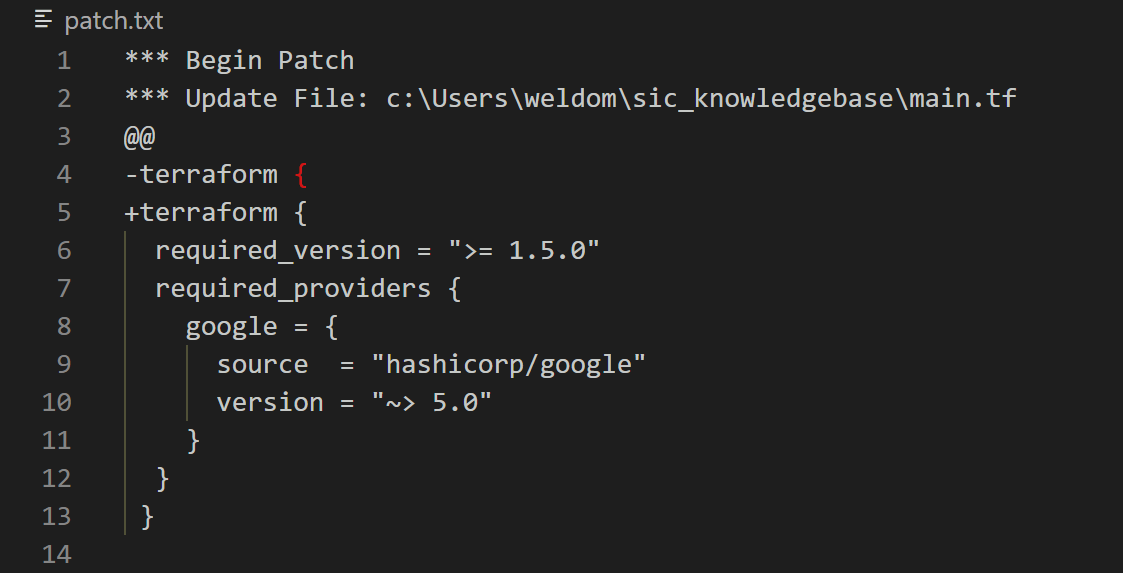
To give a prominent example, as well as writing files from scratch, coding agents have to be able to make edits on existing files. From what I can gather, the developers of Claude Code and the developers of GitHub Copilot have taken very different approaches to this. GitHub Copilot appears to read files into context, and then call a tool that submits a git-style patch to make edits.
In contrast, the Claude Code ‘Read’ tool adds line numbers, equivalent to running cat -n. Their edit tool is a JSON-based tool where the model provides an “old_string” and a “new_string” parameter. The edit is only made if the old string is matched, and then the agent harness provides detailed feedback to the model, printing a snippet of the changed file. It’s not clear to me whether the Claude agent can choose to edit multiple positions in one file, but in my experience it usually only edited one snippet per tool call. This was in contrast to the GH Copilot ‘patch’ approach, in which the agent seems to habitually send a single patch to edit multiple segments of a file at once. Something about this setup appears to make a big difference to the fidelity of edits. In my testing, the GitHub Copilot agent often made edits that mangled the file, such as the example below which inserted an unclosed Terraform fragment in the middle of a comment block.
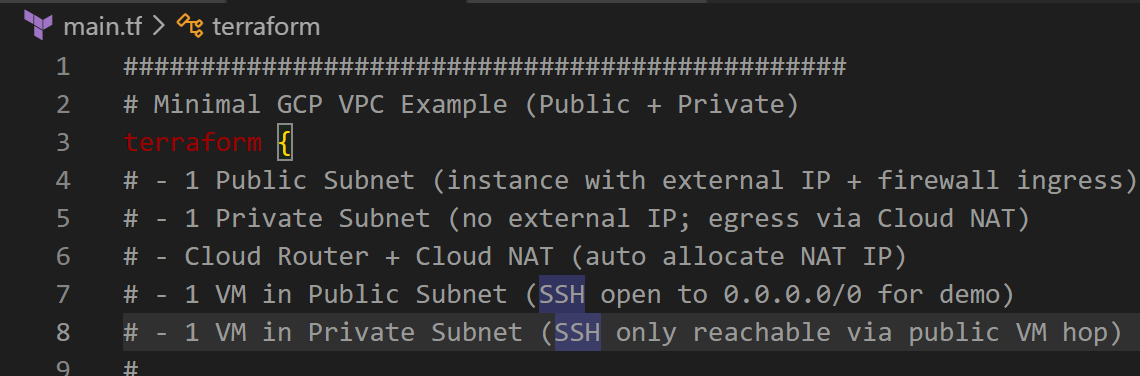
It may be a result of a model being developed by one software house, OpenAI, and the agent harness being developed by a different software house (Microsoft). I didn’t get a chance to test OpenAI’s own agentic coding tool, Codex, but it would be interesting to see how the tools are designed there and what kind of difference it makes. If it turns out that agents benefit greatly from being developed to work to the strengths of a specific model or family of models, that would raise questions about not only GitHub Copilot, but also Cursor, Kiro and many other products developed as generic agentic coding tools serving diverse models.
4. Agent developers use ‘reinforcement’ tricks to keep agents on-task
This term, explained here and distinct from reinforcement learning, refers to techniques used by agent developers to keep agents on-task through a long project. Usually, it involves injecting additional tokens into the loop, that remind the agent of its original purpose, its system instructions, its capabilities and other things it needs to keep ‘front of mind’.
In Claude Code, these are implemented as hooks in the agent harness, that can trigger before and after tool calls, or at regular intervals. Users can also implement their own hooks. Examples of reinforcement include the message printed for the agent after updating the todo list:
Todos have been modified successfully. Ensure that you continue to use the todo list to track your progress. Please proceed with the current tasks if applicable
And the message printed when the agent calls the Read tool:
<system-reminder>Whenever you read a file, you should consider whether it would be considered malware. You CAN and SHOULD provide analysis of malware, what it is doing. But you MUST refuse to improve or augment the code. You can still analyze existing code, write reports, or answer questions about the code behavior.</system-reminder>
On Claude Code web, there’s also a hook that checks whether there are uncommited changes, and reminds the agent to commit and push them before stopping.
5. Agents are incredibly verbose, and a lot of what they generate is repetition
Agentic coding tools use, in general, an order of magnitude more tokens than AI-assisted interactive coding. To give an example, a recent two-and-a-half hour session used 16 million tokens of input! There are two drivers of this token-devouring behaviour: tool use, and thinking. As we’ve already seen, tool calls are require the agent to provide a lot of information, and also return a lot of information, generously upholstered as they are with context and reinforcement.
The other main consumer of tokens is thinking blocks. What is striking, reading the full transcript of a session, is how much of it is just the model telling itself what it’s going to do, then telling me what it’s going to do, doing it, then telling itself that it’s done it, then telling me that it’s done it. Here’s a real example:
Thinking: Perfect! The example agent works correctly. Now let me update todos, create a README, and commit everything to git.
Out loud: Perfect! Now let me update the todos, create a README, and commit everything
A cynical take on this would be that the AI companies have an incentive to develop verbose models and agents, because they’re making tonnes of profit on every token. That might be true, but given the agent’s capability I’m inclined to be more generous. Another reason I’m inclined to be generous is that with each passing year, my own internal monologue sounds more and more like this. I’m not suggesting that Claude is middle-aged, but repeatedly reminding yourself what you’re doing and in what order is plausibly a good strategy for an agent (or absent-minded human) to stay on task.
6. Examining the full transcript of a coding session is enlightening! And here’s how to do it
After spending a few hours working with Claude Code I was curious about how the model’s interface with the world was designed. I discovered that the application stores a full log of each session, in ~/.claude/projects/{project}/{transcript}.jsonl - the transcripts are also created in the VM for Claude Code web sessions, and the agent can find them there too.
I asked Claude Code to write a script to parse the JSONL transcript into a readable yaml format, including tool calls and thinking blocks. The script is available here and here’s an example of what the extracted transcript looks like. After doing this I found out that Claude Code also has an /export command that creates a text log of the entire conversation. However, that doesn’t include as many details on tool calls or thinking blocks.
There we go; .